 Now on the Mac App Store
Eyevo for Mac: your Pokémon card collection on the big screen
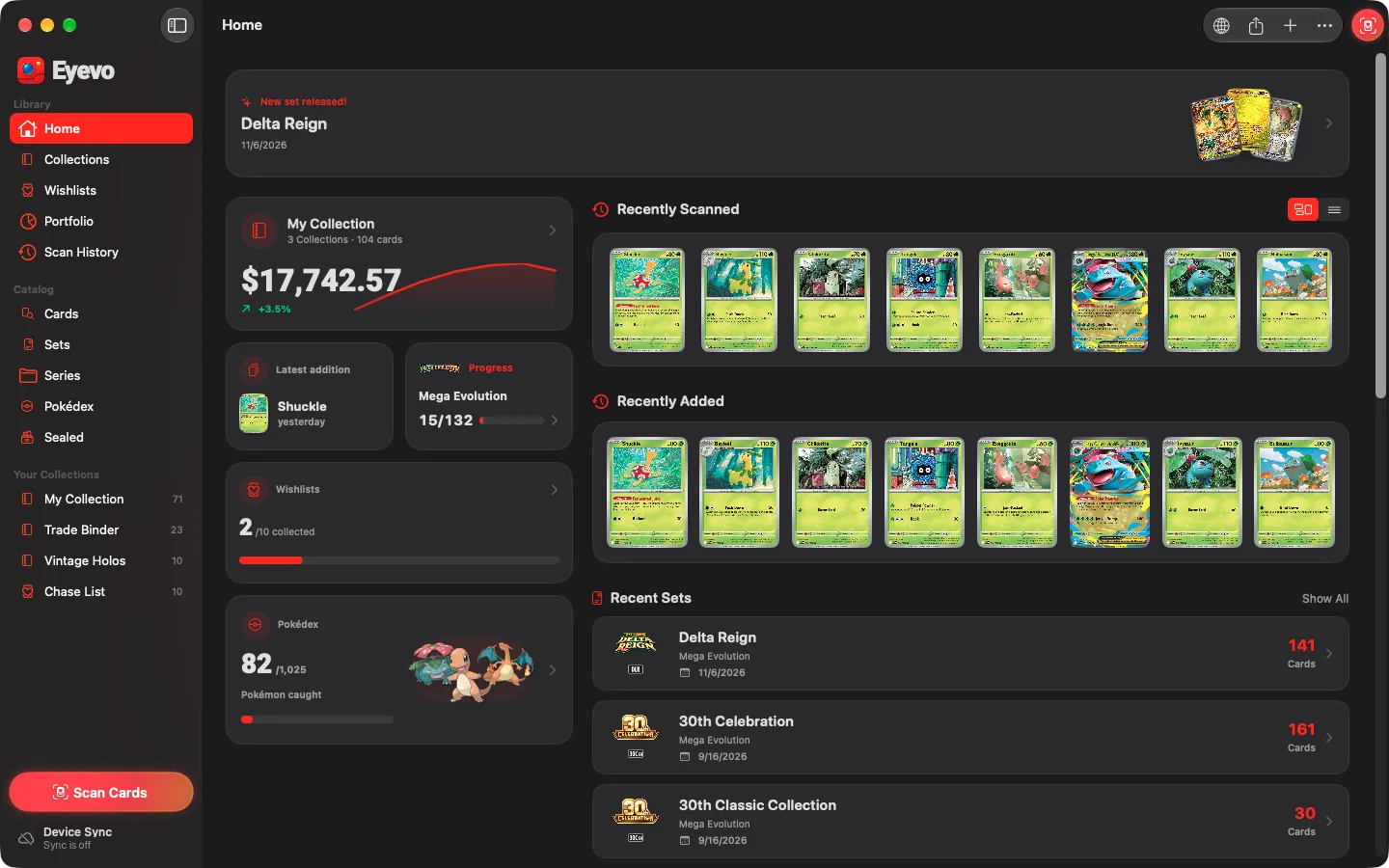
Eyevo now has a native Mac app. Scan cards with Eyevo on your iPhone and they appear on your Mac as you scan. Then sort them into collections and binders, follow set and master set progress and check prices in a full desktop window.
At a glance
- Requires
- macOS 26 or later
- Price
- Free download, Eyevo Pro optional
- Eyevo Pro
- Same App Store app as on iPhone
- Scanning
- With Eyevo on your iPhone
- Sync
- Free between iPhone and Mac
Scanning
Scan on your iPhone, see it on your Mac
The Mac app has no camera scanner of its own. Pair your iPhone once: open Device Sync on the Mac, choose the Mac collections to share, then point your iPhone's camera at the pairing code and connect.
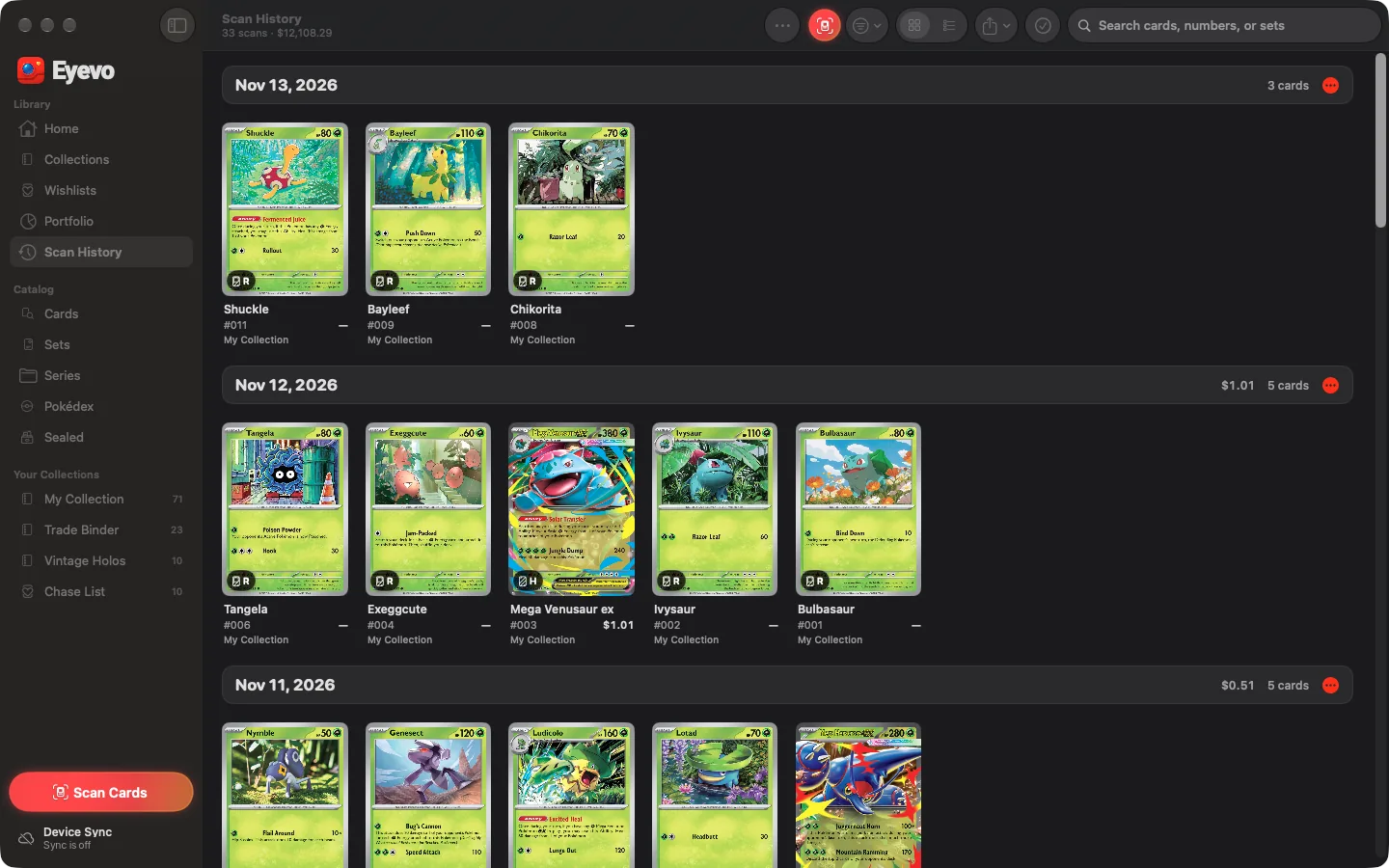
After that, open the scanner in Eyevo on your iPhone while Eyevo runs on the Mac. While the scanner is linked, each card you scan lands on the Mac right away, in the collection your iPhone scans into if the Mac has it, otherwise in the Mac's scan destination. If the connection drops, the iPhone saves the scans and sync brings them over.
Quick Connect in the Mac's Scan Cards window lets any iPhone with Eyevo send its scans while that window is open, without joining your sync.
Collections
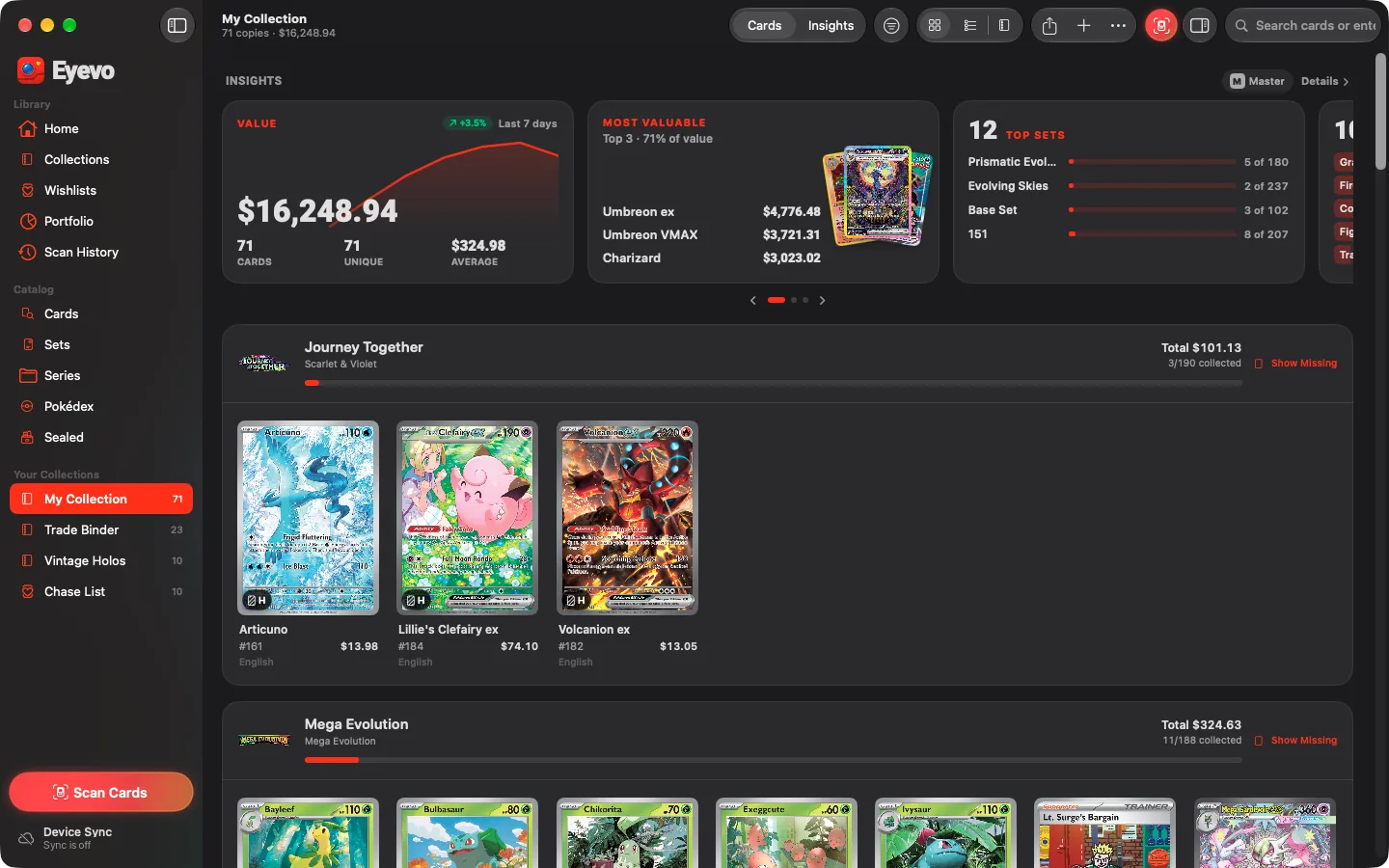
Collections, folders and wishlists in a Mac sidebar
Your collections and wishlists sit in the sidebar with their copy counts. A collection opens with its value and seven-day trend, the most valuable cards and top sets, then one section per set with its completion.
Command-click and Shift-click select several copies to move, edit or remove. Folders, Show Missing Cards and master set progress work as they do on iPhone.
Binder
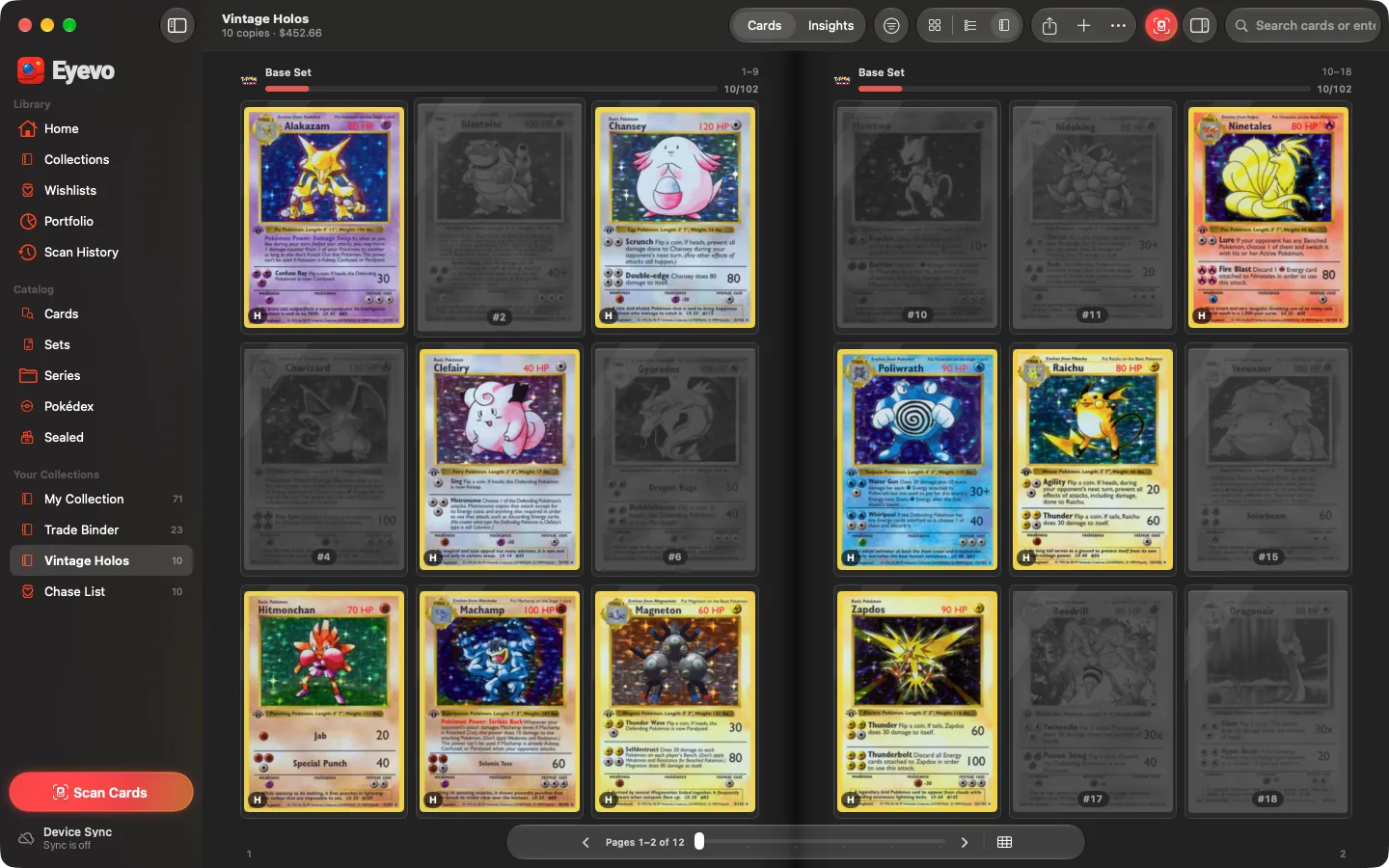
A binder you can page through
Any collection or wishlist opens as a binder, with nine pockets a page and a two-page spread in a wide window. Sorted by set, each set starts on a new page in printed-number order, and missing cards stay greyed in place.
Turn pages with the arrow keys, a trackpad swipe or the page bar. Click a missing pocket in a collection to add that card.
Value
Portfolio and value over time
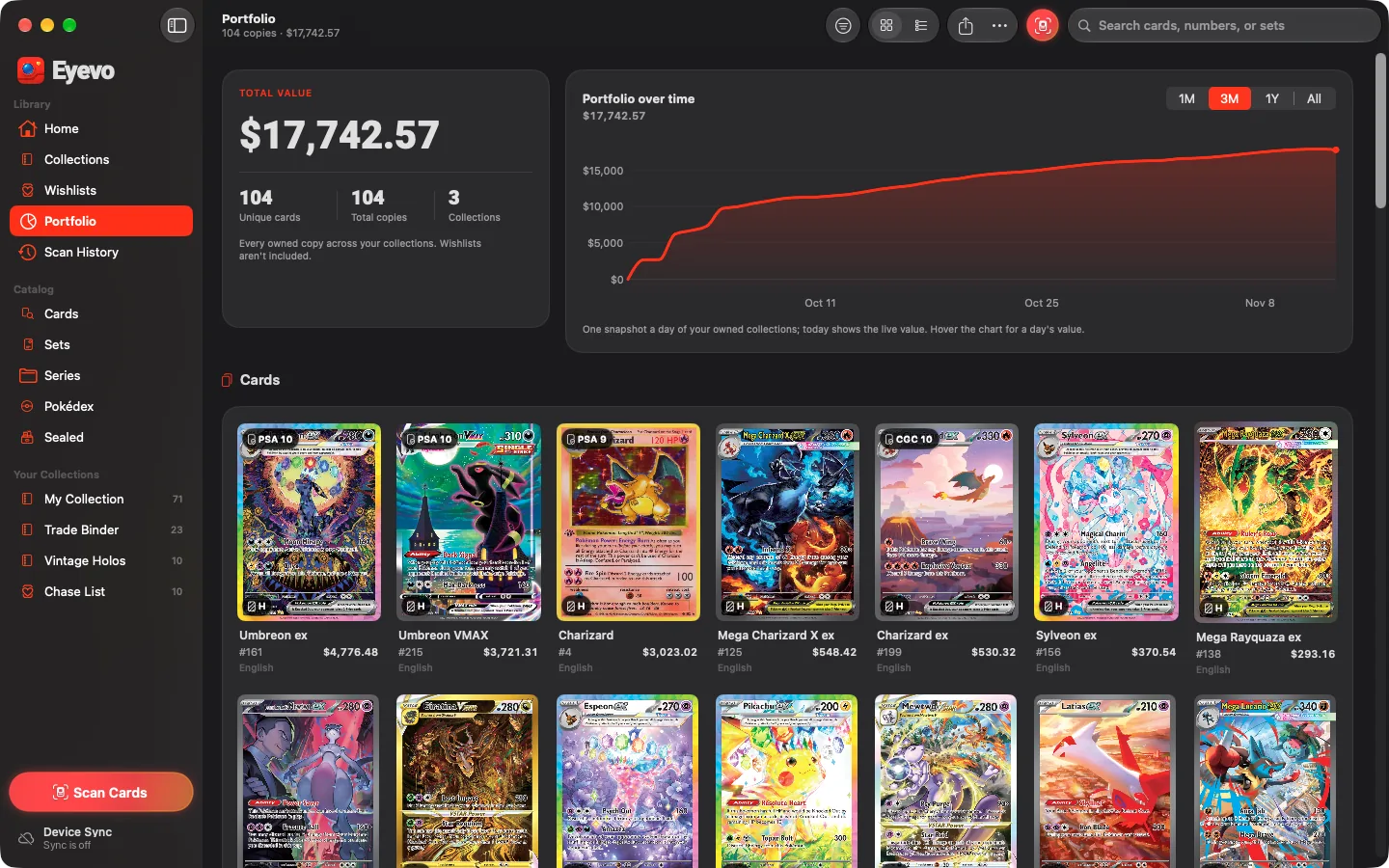
Portfolio lists every owned copy across your collections with the total value and a chart over one month, three months, a year or all time. It's part of Eyevo Pro, as on iPhone.
Insights is free in every collection: value over the last 30 days with a CardMarket or TCGPlayer switch, top sets, set completion and the cards rising or falling on the market.
Prices in these screenshots are from 14 November 2026. Prices are market guides, not offers, and not investment advice.
Sets and Pokédex
Set pages, master sets and the Pokédex
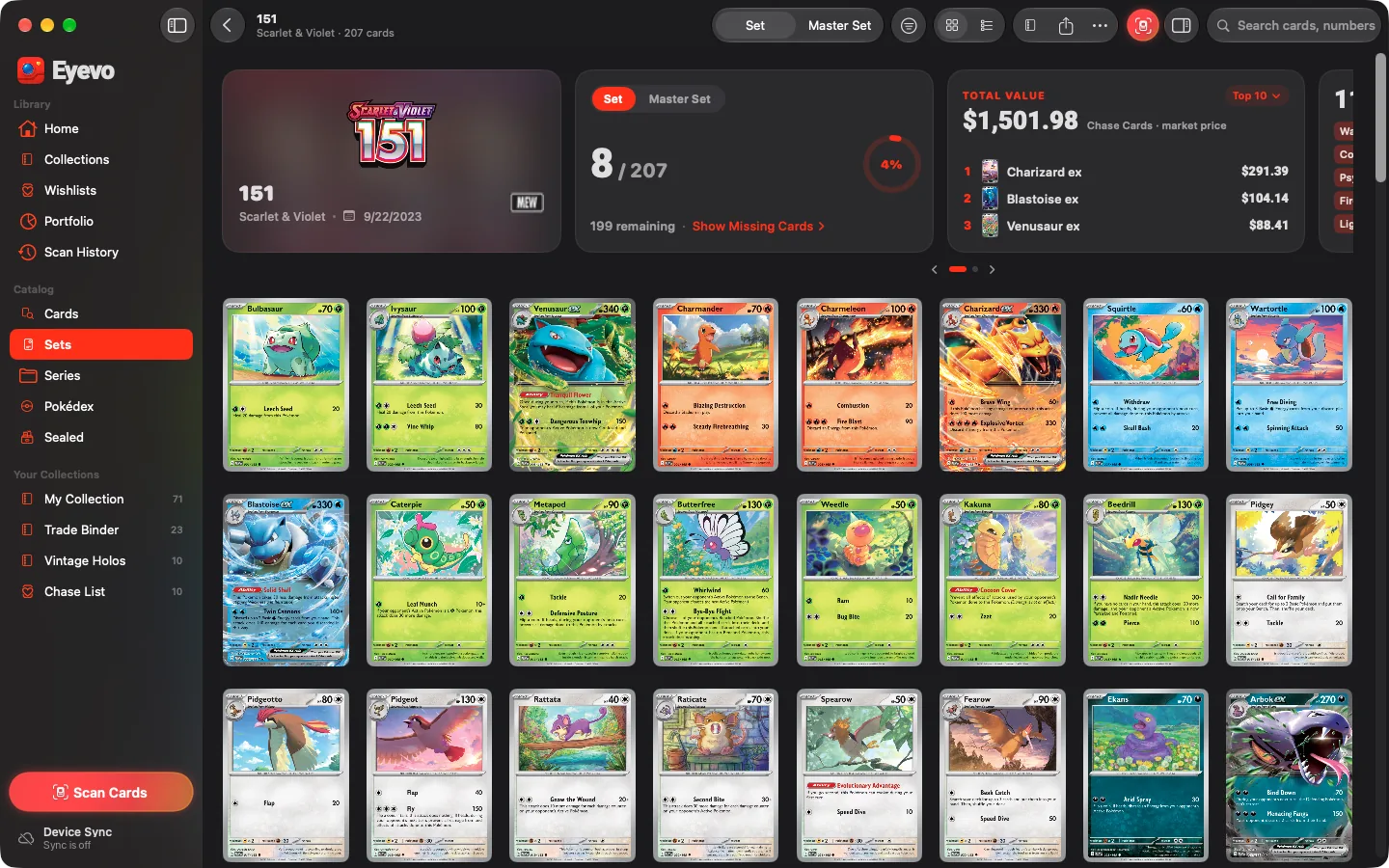
A set page shows your progress for the set or the master set, how many cards are missing, the set's total value and its chase cards. In Collection Mode a click on a card adds it to your collection, or removes its newest copy if it's already there; Edit → Undo reverts either.
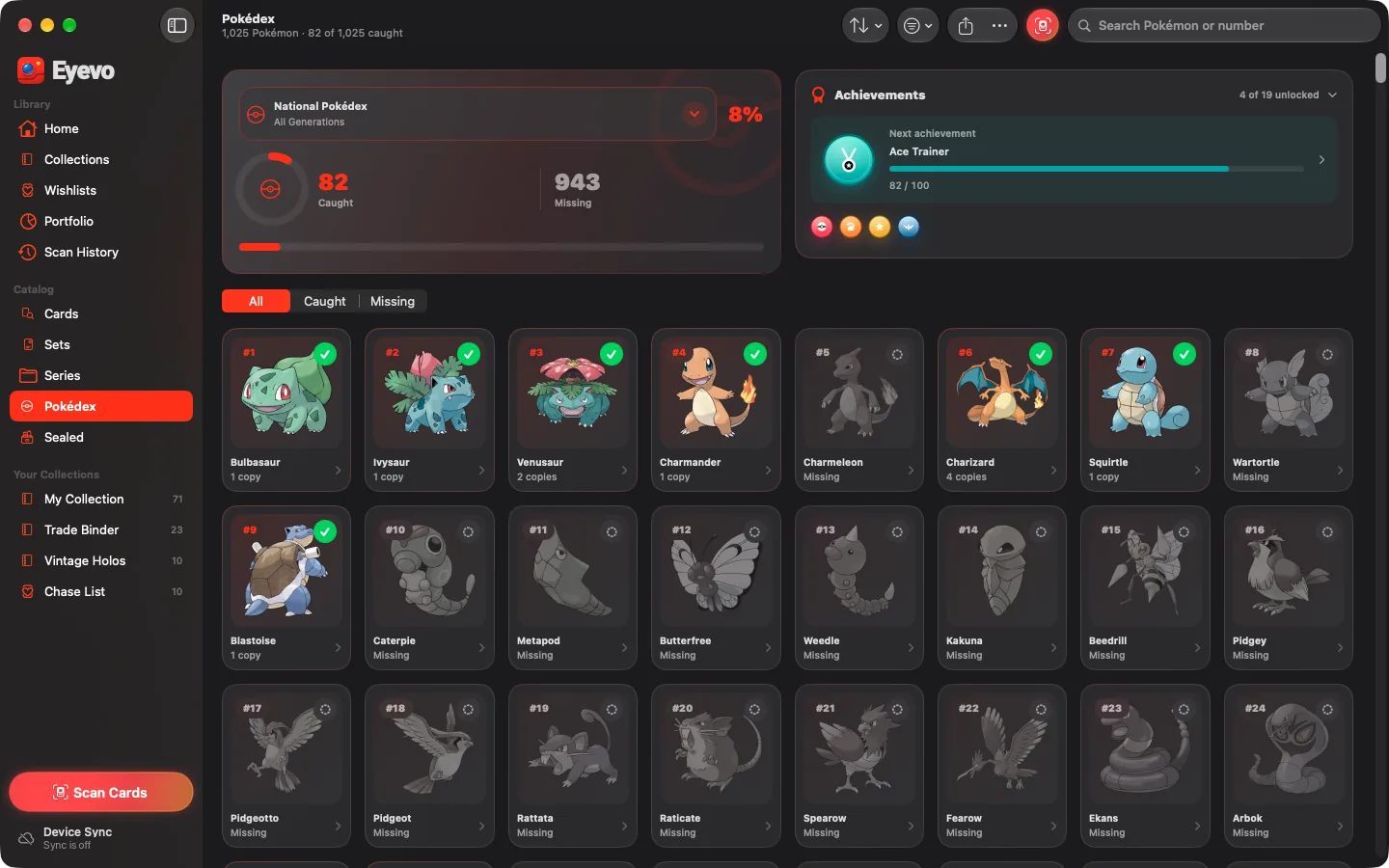
The Pokédex counts the Pokémon you've caught across your collections, for the National Pokédex or one generation, with achievements and a page per species listing every card of it.
Search and prices
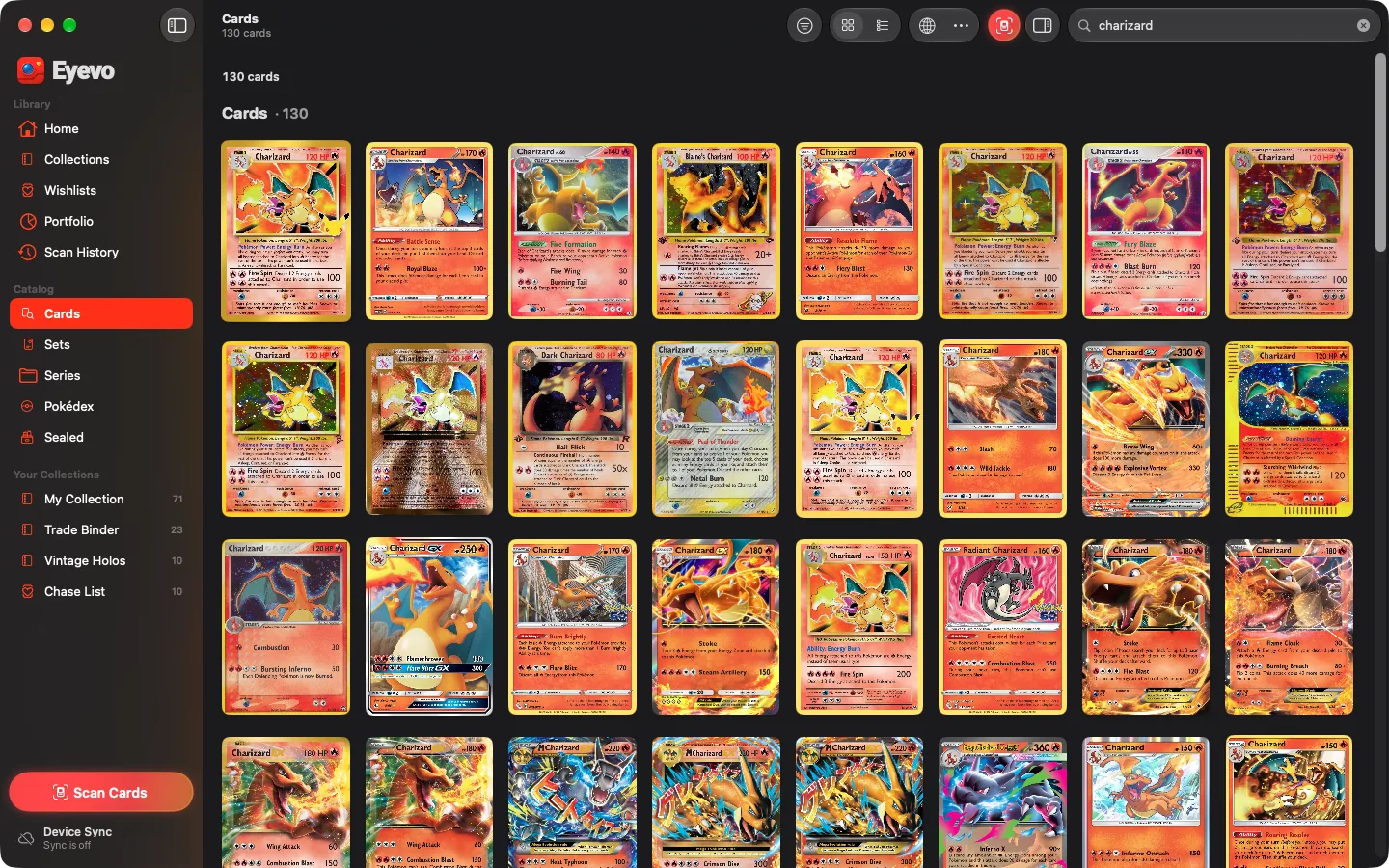
Card search and prices for the exact printing
Search by name in any catalog language, by number such as 4/102, by printed set code such as MEP 101 or by card ID. Swapped or extra letters, as in pikahcu, still find the card.
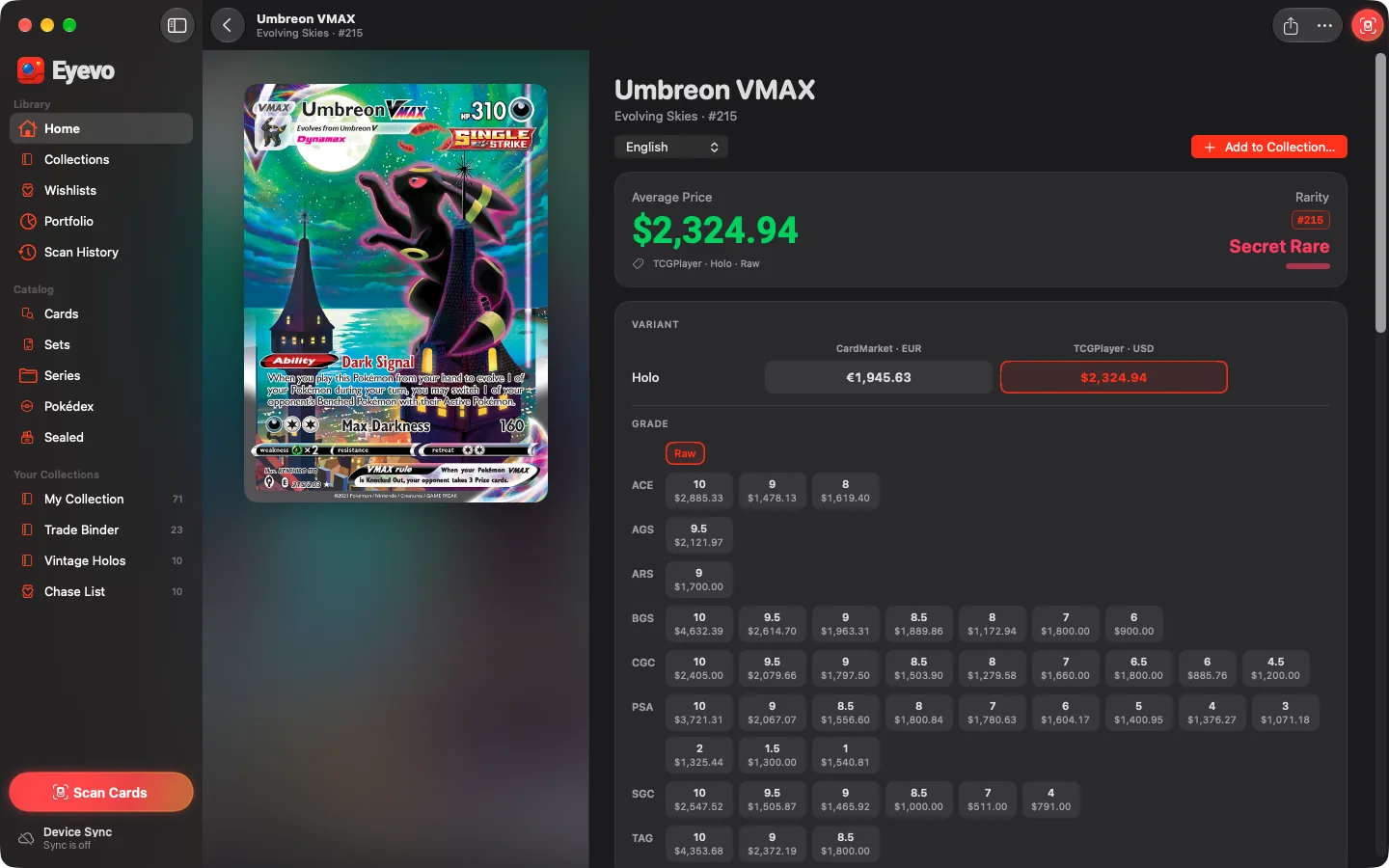
A card page shows TCGPlayer and CardMarket prices for each printing in your currency, graded prices by company and grade, and the card's details. Graded prices, price history and sold comparisons are Eyevo Pro. Generate Listing writes an eBay title, description and suggested price for free.
Also on the Mac
-
Sealed products
Booster boxes, Elite Trainer Boxes and other sealed products with prices, plus custom products with your own photo and price.
-
Share Studio
Share a card, set, collection or your portfolio as an image, or a set, collection or portfolio as an 11-second story video.
-
Import and export
Import the CSV and JSON files Eyevo exports on iPhone, iPad or Mac. An .eyevocollection copy exports and imports for free; data export as CSV, JSON, text or TCG PowerTools needs Eyevo Pro.
-
Your currency
Prices in your preferred currency, with TCGPlayer or CardMarket as the default source. Japanese and Chinese catalogs are optional downloads.
-
Made for the Mac
A native sidebar, toolbar, inspector and menu bar, with shortcuts such as ⌘N for a new collection and ⌥⌘F for card search.
-
Works offline
Installed catalogs and your collections stay usable offline. Card artwork loads when you're online unless it's already cached.
One Eyevo Pro for iPhone and Mac
Eyevo for Mac is the Mac version of the same App Store app, not a separate purchase. The download is free, and the Mac checks the same Eyevo Pro access as the iPhone app. If you already have Pro on your iPhone, use the same Apple Account on the Mac. If Pro doesn't show up, choose Restore Purchases in Settings → Eyevo Pro.
Free on the Mac
- Collections, wishlists and folders
- Binders, set and master set progress
- Pokédex
- Card search and raw TCGPlayer and CardMarket prices
- Insights for every collection
- Share images and story videos
- Import Eyevo exports and .eyevocollection copies
- Sync with your iPhone and receive its scans
With Eyevo Pro
- Portfolio and its value over time
- Graded prices, price history and sold comparisons
- Data export as CSV, JSON, text or TCG PowerTools
- Collection sharing links
- Split Collection
What Eyevo for Mac doesn't do
- It can't scan with the Mac's camera or from photos. Scanning happens in Eyevo on your iPhone, which keeps its usual scan limits.
- It needs macOS 26 or later.
- Value charts start on the Mac. Your iPhone's value history isn't copied, because sync carries cards, not daily snapshots.
- There are no widgets on the Mac. Only card scans reach the Mac live; sealed products scanned on the iPhone arrive through sync.
- A custom sealed product's name and photo stay on the device where you made it; its copies and price sync.
Questions about Eyevo for Mac
Is Eyevo for Mac free?
Yes. The download is free. Eyevo Pro is optional and is the same Pro as on iPhone; Portfolio, graded prices, price history, data export and collection sharing need it.
Do I need an iPhone?
Only to scan. Without an iPhone you can search the catalog and add cards, or import an Eyevo CSV or JSON export.
Does my Eyevo Pro subscription work on the Mac?
Eyevo for Mac is the Mac version of the same App Store app and checks the same Eyevo Pro access. Use the Apple Account you subscribed with. If Pro doesn't show up, choose Restore Purchases in Settings → Eyevo Pro.
Will my iPhone collections show up on the Mac?
Yes, once you connect them. On the Mac, open Device Sync, choose the Mac collections to share and create the pairing code. Scan it with your iPhone, pick the iPhone collections to sync and connect. Syncing with a Mac doesn't need Eyevo Pro.
Does Eyevo for Mac work offline?
Yes. Installed catalogs and your collections stay usable offline. Card artwork needs a connection unless it's already in the image cache.
Get Eyevo for Mac
Free on the Mac App Store for macOS 26 or later. Install Eyevo on your iPhone too, then pair it from Device Sync on the Mac to scan.